The Role of Tools in AI Agents
By:César Medina
Contact: cesar.medina@innovox.com.br
- 8 minutes read - 1617 wordsArticle 4 of the Agentic AI Series: Systems that Perceive, Decide, and Act
< Previous Article | Next article >
Imagine hiring a brilliant consultant, someone with encyclopedic knowledge of finance, medicine, law, and programming. But this consultant can never access the internet, cannot call anyone, cannot open a document, and cannot perform a bank transfer. He can only speak.
Would this consultant be useful? Yes. But would he be powerful? Definitely not.
This is exactly the problem with an LLM without tools.
In the previous article, we saw the anatomy of an AI agent: perception, memory, planning, and action. Tools live in the action layer, and without them, the agent is trapped within itself.
An LLM, by nature, is a text-completion machine. Given an input, it generates a textual output. The model produces text and nothing more. It remains inert to the external world, oblivious to what happens after it responds.
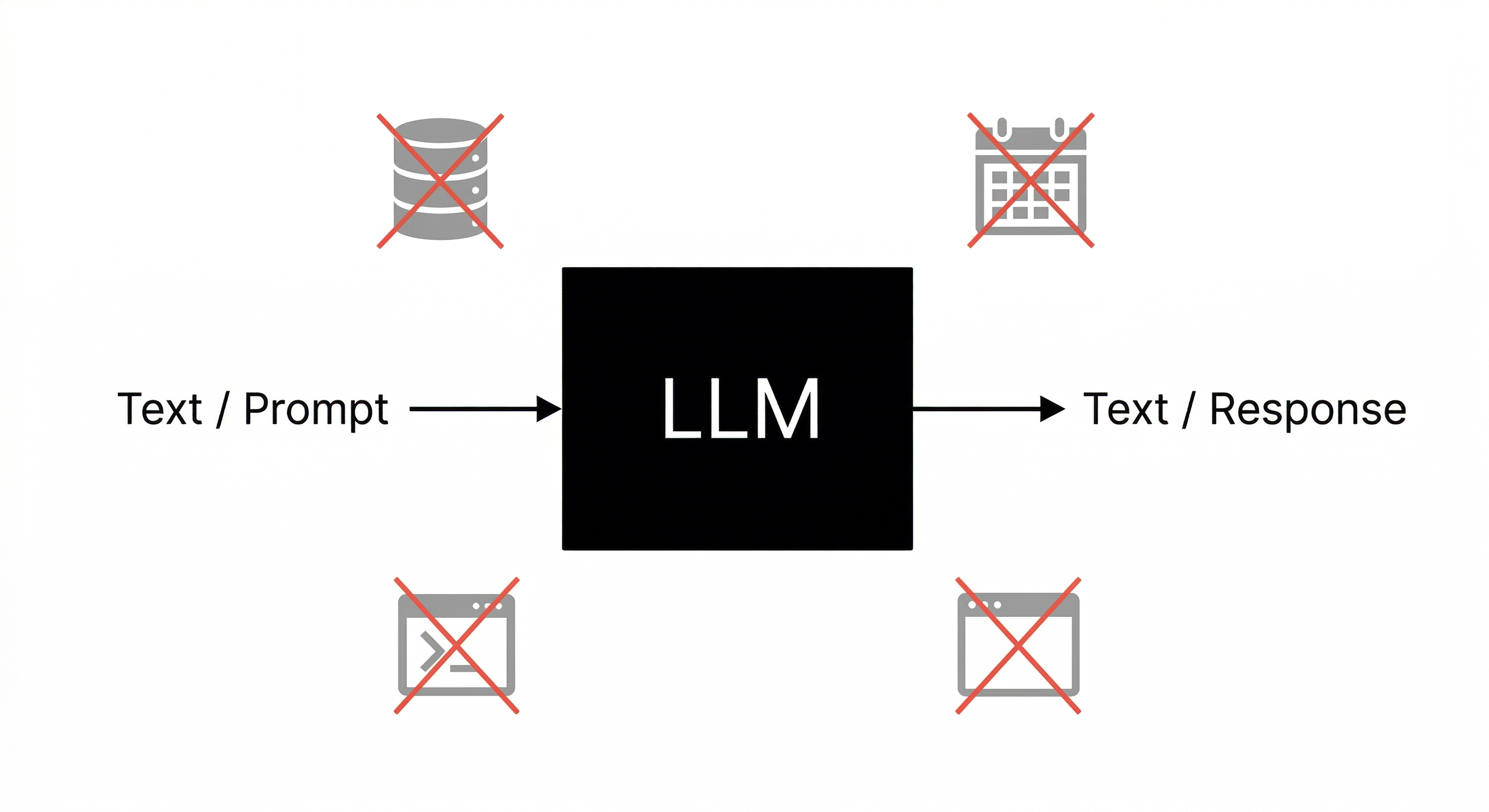
This is not a defect; it is simply what a language model is. What changes everything is what we place around it.
What Are Tools?
In the context of AI agents, a tool is any function, API, or automation that the agent can invoke to interact with the external world or execute a concrete task.
Think of it as a menu of capabilities. When processing a task, the agent can “request” to execute one or more tools, receive the result, and continue its reasoning based on this new information.
Concrete examples of tools:
| Tool | What it does |
|---|---|
search_web(query) | Searches for real-time information on the internet |
read_file(path) | Reads the contents of a file in the system |
send_email(to, subject, body) | Sends an email |
query_database(sql) | Executes a query in a database |
Calendar(...) | Creates an event in Google Calendar |
run_python_code(code) | Executes a snippet of Python code |
call_api(url, method, body) | Makes an HTTP call to any REST API |
Each of these tools is a bridge between the world of text and the real world.
How Does the Agent Use a Tool?
The agent does not execute the tools directly. Instead, it declares the intention to use a tool in a structured format. The system surrounding the agent (the orchestrator) then executes the actual tool and returns the result to the agent.
The flow looks like this:
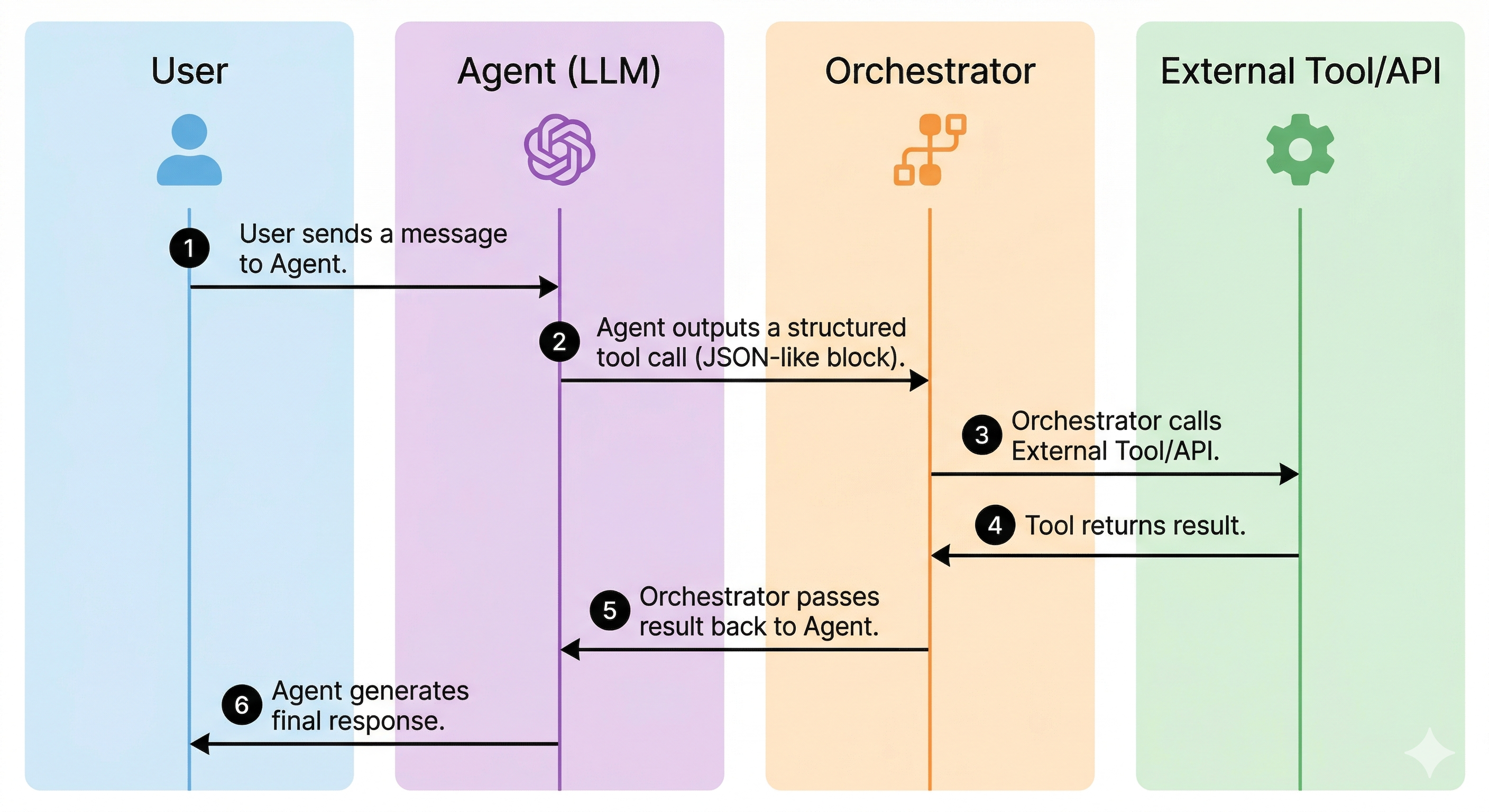
In practice, when you use a model like Claude or GPT with tools enabled, the model learns to issue function calls in a structured JSON format. The framework (LangChain, LlamaIndex, CrewAI, or a custom system) intercepts this output, executes the corresponding function, and injects the result back into the model’s context.
The model then reads the tool’s output as additional context and continues its reasoning.
Three Fundamental Categories of Tools
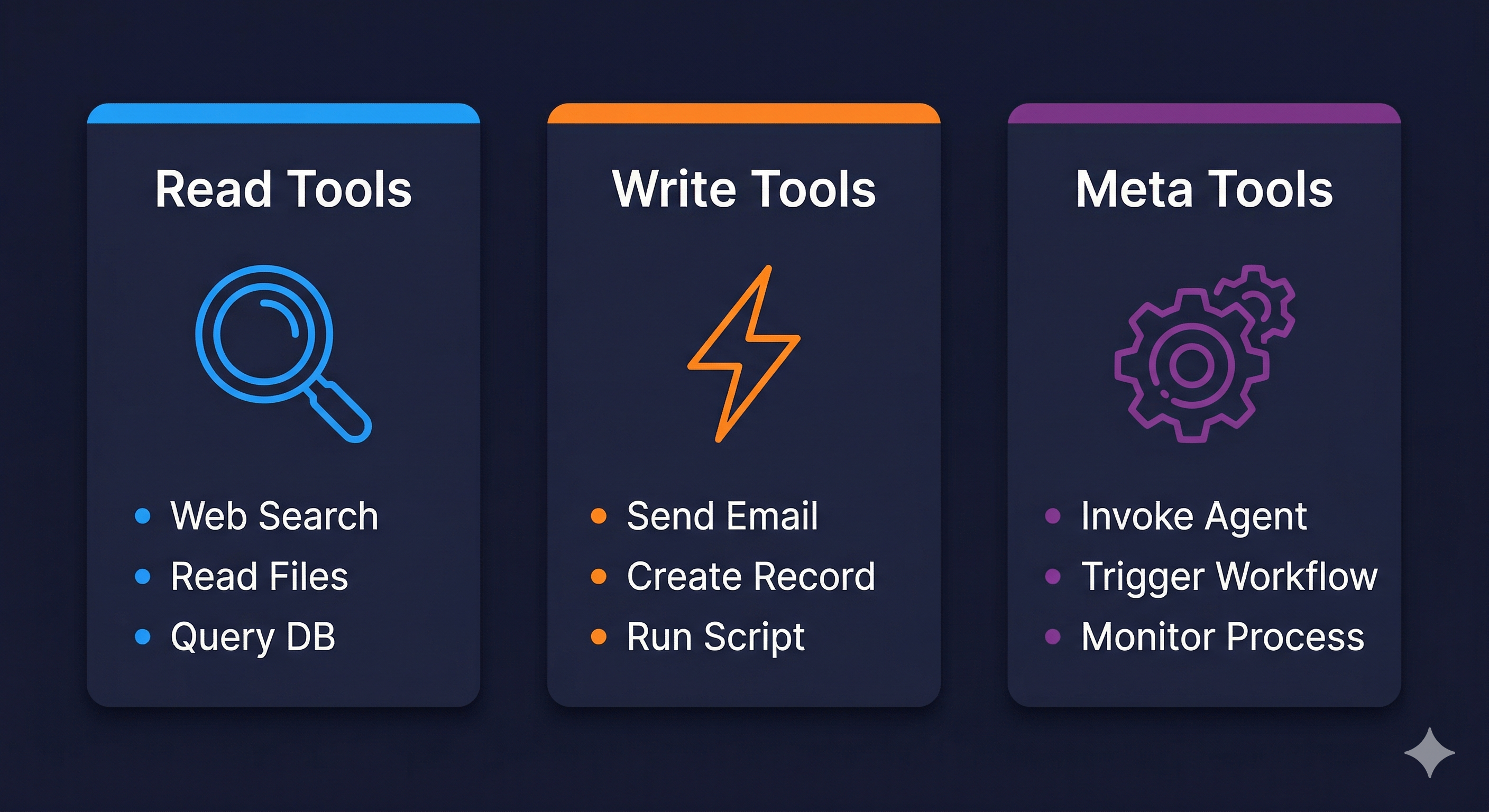
It is useful to categorize tools into three main groups based on the type of effect they produce:
1. Read Tools
These expand what the agent can know. They bring in information without altering the state of the world.
- Web search
- Reading files and documents
- Database queries (SELECT)
- Data API calls (weather, stock quotes, news)
- Reading emails or messages
These are the safest tools. Systems in production release them more easily.
2. Write / Action Tools
These produce a real effect on the world. They alter the external state.
- Sending emails or messages
- Creating database records (INSERT, UPDATE, DELETE)
- Executing scripts or commands
- Posting on social media
- Creating tasks or tickets
These tools require more caution. A poorly designed agent might, for example, send emails in a loop or delete records by mistake.
3. Composition Tools (Meta Tools)
Tools that invoke other agents or more complex orchestrations.
- Calling a specialized sub-agent
- Triggering a workflow on an automation platform (n8n, Zapier, Make)
- Initiating an asynchronous process and monitoring its result
This category is what allows for building multi-agent systems, which we will explore in depth in future articles.
Why an Agent Without Tools is Fundamentally Limited
An LLM without tools is an agent in an early stage, capable of reasoning but incapable of acting.
Consider the most common use case: a customer support assistant. Without tools, the agent can:
- Explain company policies (if they are in context)
- Suggest generic solutions
- Answer frequently asked questions
With tools, the same agent can:
- Consult the real customer history in real-time
- Check an order status directly in the system
- Issue a refund automatically
- Create a ticket and assign it to the correct team
- Send an email or SMS notification confirming the action
The difference is radical: on one side, a chatbot; on the other, a system that actually solves problems.
Intelligence without agency is consultation. Intelligence with agency is execution.
The Concept of Function Calling
The technical mechanism behind all this has a name: function calling (or tool use, as Anthropic calls it in Claude).
The idea is simple: you define the available tools for the model in a structured schema (usually JSON) describing the function name, what it does, and what parameters it accepts. The model is trained to, when appropriate, return a function call instead of (or in addition to) free text.
A simplified example of how a tool is defined:
{
  "name": "lookup_order",
  "description": "Searches for information about a customer order in the system.",
  "parameters": {
    "type": "object",
    "properties": {
      "order_number": {
        "type": "string",
        "description": "The unique order number, in the format ORD-XXXXX"
      }
    },
    "required": ["order_number"]
  }
}
When the agent decides to use this tool, it returns something like:
{
  "name": "lookup_order",
  "arguments": {
    "order_number": "ORD-00421"
  }
}
The system then executes the actual function with this argument, obtains the result (e.g., order data), and injects it back into the model’s context. The model continues and uses this data to formulate its response.
How to Design Tools
The quality of the designed tools matters significantly for an agent.
An agent is only as good as the tools at its disposal and the clarity with which those tools are described. If a function description is ambiguous, the model might call it at the wrong time, with the wrong parameters, or fail to call it when it should.
Some best practices for designing tools are:
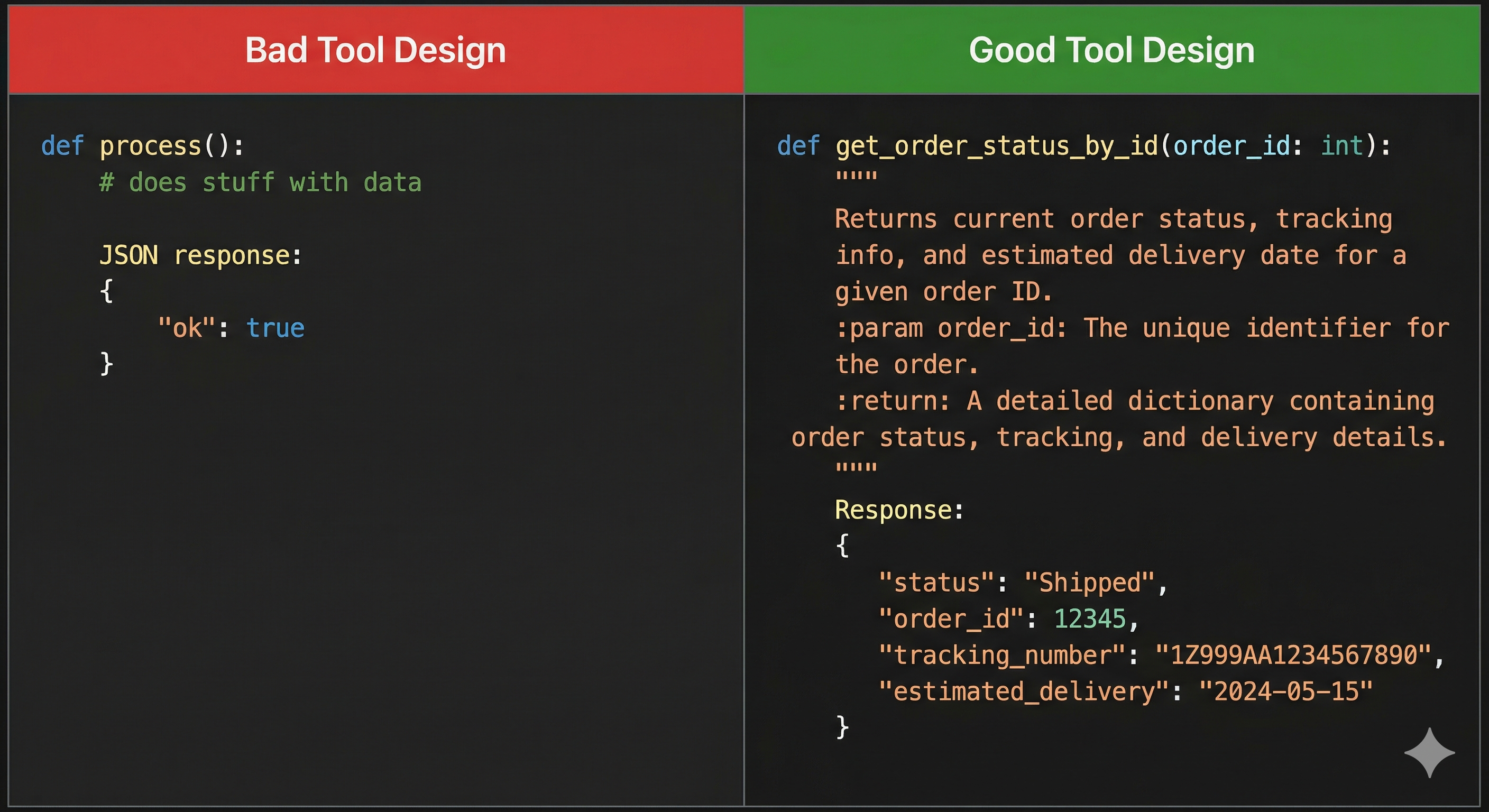
1. Precise names and descriptions
The model uses the name and description to decide when and how to use the tool. Be specific. get_weather is better than weather. search_customer_by_email is better than search_customer.
2. Adequate granularity A tool that does too much is hard to control. Prefer tools with a single, well-defined responsibility. However, tools that are too granular require the agent to make many chained calls, increasing latency and the risk of error.
3. Rich and structured returns
The output of a tool should contain enough context for the agent to continue. Returning just {"status": "ok"} is usually not enough. Include relevant data that the agent needs to reason about the next step.
4. Explicit error handling If a tool fails, the return should make it clear what happened and, if possible, suggest an alternative. An agent that receives an error without an explanation becomes “lost” and may make wrong decisions.
A Real Example: Scheduling Agent
Imagine a scheduling agent for a medical clinic. The available tools are:
check_availability(doctor_id, date_range): checks for free slotsbook_appointment(patient_id, doctor_id, datetime): creates the appointmentsend_confirmation(patient_id, appointment_details): sends confirmation via email/SMSlookup_patient(email_or_cpf): finds the patient in the systemget_doctor_info(doctor_id): returns information about the doctor
A conversation with this agent could be:
User: I want to schedule a consultation with a cardiologist for next week.
The agent then executes, internally, something like:
get_doctor_info→ finds available cardiologistscheck_availability(doctor_id=42, date_range="next week")→ returns free times- Presents the options to the user
- User chooses: “Thursday at 2 PM”
lookup_patient(email="user@email.com")→ retrieves patient IDbook_appointment(patient_id=1337, doctor_id=42, datetime="2026-04-09T14:00")→ confirms the appointmentsend_confirmation(...)→ sends confirmation
What seems like a simple conversation is, under the hood, an orchestration of 5 calls to different tools, all coordinated autonomously by the agent.
Risks
The use of tools requires careful architectural planning. A poorly designed or poorly instructed agent with access to write tools could:
- Send unauthorized emails on behalf of the company
- Delete records in a database
- Make unwanted purchases or financial transactions
- Expose sensitive data by calling the wrong APIs
For this reason, well-architected agent systems implement the principle of least privilege: the agent only has access to the tools necessary for the task. For example, for support agents, only read tools are provided.
It is also important to implement human-in-the-loop confirmations for irreversible actions, especially in production environments. Before an agent sends an email to 10,000 customers, a human should review it.
We will return to this topic in depth when we talk about security in AI agents.
Tools as an Interface with the World
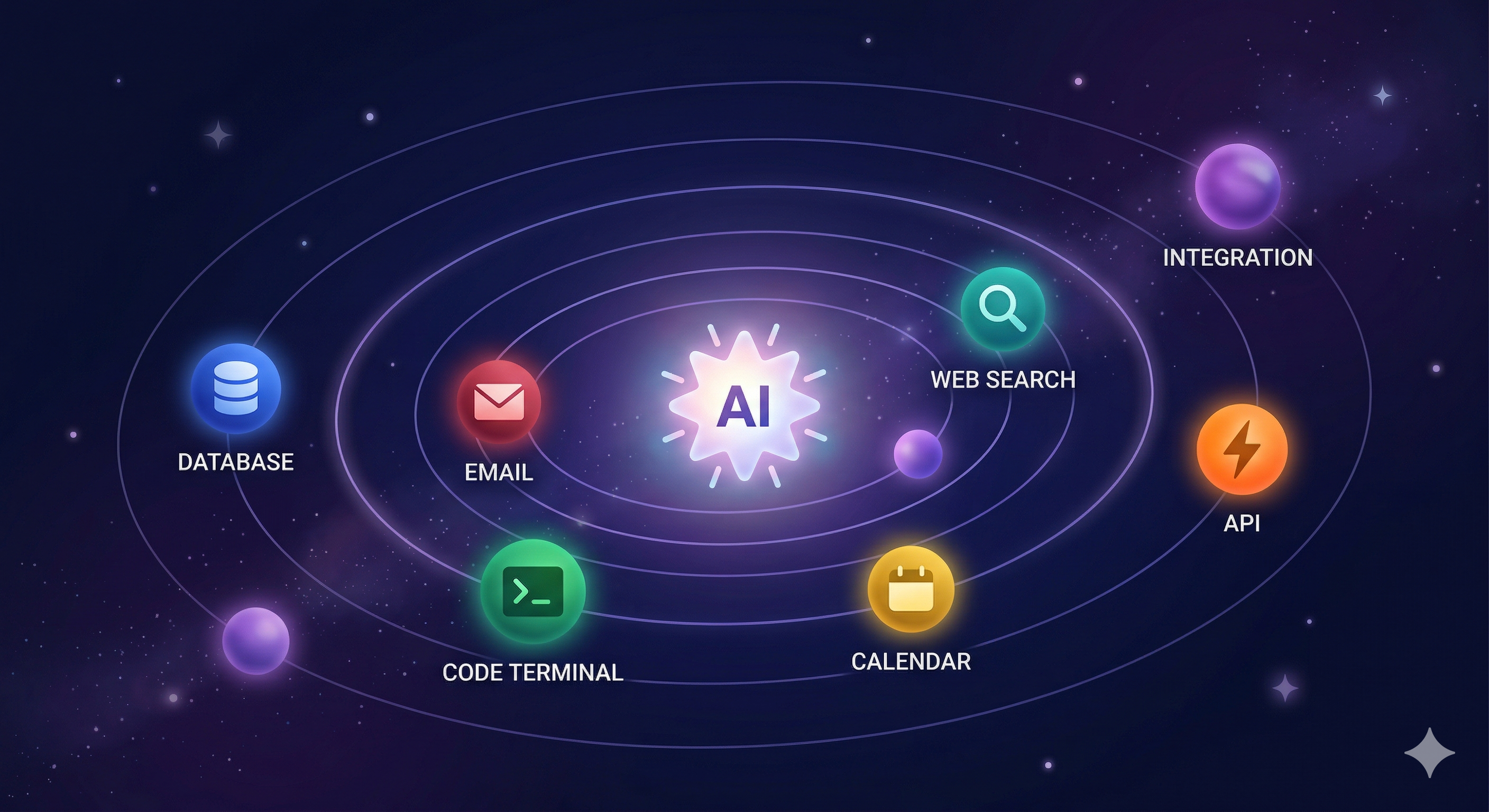
Tools are the agent’s interface with the world. Through them, the agent moves from reasoning to action.
When designing an agent system, the central question is not just “which LLM to use?” but also “what tools does this agent need? Which can it have? Which is it better it never has?”
The set of available tools defines the agent’s possibility space. Expand this space carefully and monitor behavior.
Conclusion: Tools Are What Make Agents Real
An LLM without tools is intelligent but inert. With tools, it acts: it queries, creates, sends, and executes. The choice of which tools to provide, and with what restrictions, is the most important design decision in any agent system.
In the next article, we explore the types of agents: reactive, planners, and autonomous, and how the set of available tools determines which category an agent fits into.
This is the fourth article in a series on Agentic AI—systems that perceive, decide, and act. It is technical enough for developers but still accessible to beginners.
Engineering team at InnoVox Engineers focused on building reliable AI systems